Quickstart
Install LaunchZero, let guided setup configure OpenClaw or Hermes, and watch a monitored tool call get gated and recorded - in minutes.
Last updated
This guide takes you from nothing installed to a running agent with governed tools - in minutes. LaunchZero’s policy, approval, execution, and Activity path runs on your own hardware. Guided setup installs and configures OpenClaw, Hermes, or both and turns on the recommended policy posture, so you do not hand-edit config or run CLI commands to get started.
By the end, the recommended Balanced posture lets common reads run, asks for approval on selected writes and sends, and denies unknown calls. Governed activity is recorded in the tamper-evident Activity trail.
Before you start
You’ll need:
- A supported OS: Windows 10/11, macOS 13+, or Linux (x86_64 or arm64). See the per-platform install guides for details.
- An API key for the model you want your agent to use. The setup wizard prompts for it and keeps LaunchZero-managed key material in the encrypted, machine-bound secret store rather than plaintext LaunchZero-managed configuration.
You do not need to install an AI agent, .NET, or Node.js first. The installer includes everything it needs, and the setup wizard installs and configures your agent - OpenClaw, Hermes, or both side by side - for you.
1. Install LaunchZero
Download the package for your platform from the download page and follow the matching guide below. Guided setup does not require a command or configuration value to paste into a terminal. If you want to verify the download first, compare its SHA-256 against the value shown on the download page.
Platform-specific steps and screenshots live in the install guides:
2. Run the setup wizard
Run the LaunchZero installer you just downloaded - it is the setup wizard. (There’s no tray icon or applications-menu entry yet; those appear once setup finishes.) The wizard takes you from nothing to a running, governed agent in four phases - Choose → Connect → Model → Launch. Along the way it:
- Brings up the gateway - the three planes (GatewayServer decides, Executor runs tools, HostIntegrity watches) - initializes the encrypted, machine-bound secret store (its keys are sealed to this machine), and applies the recommended Balanced posture: common reads may run, selected writes and sends ask for approval, and unknown calls deny.
- Detects, installs, and configures your agent(s) - OpenClaw, Hermes, or both side by side - sets up the model and API key, and writes LaunchZero into each agent’s own configuration so monitored tools and LaunchZero-managed integrations use the policy and evidence path. No terminal, no hand-edited files.
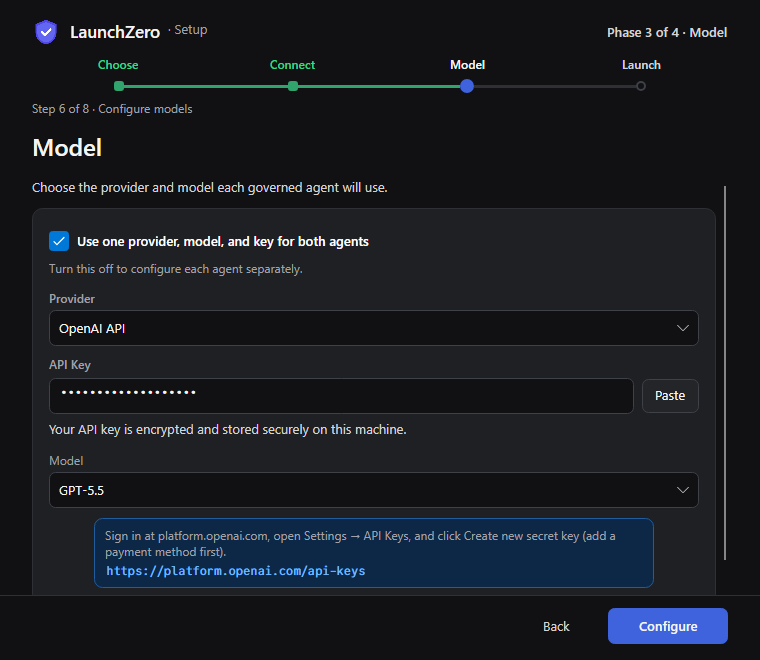
When the wizard finishes, the tray agent starts and launches the ControlApp. Open the dashboard any time from the tray icon - it loads and signs you in automatically - to see status, approvals, activity, and policy.
3. Your agent is already connected
Because the wizard wrote LaunchZero into your agent’s own configuration, there’s nothing to connect by hand. Your agent (OpenClaw or Hermes) now has LaunchZero’s monitored tools, and LaunchZero-managed integrations are registered behind per-tool policy proxies. Existing foreign MCP entries remain unchanged until you explicitly adopt or reinstall them through LaunchZero. You can talk through the agent’s built-in chat or LaunchZero’s Chat. In either workflow, monitored tools and LaunchZero-managed integrations remain inside the same policy and evidence boundary.
Exactly what the wizard changed in the agent’s config is covered in Connect your agent.
4. You’re governed by default
You don’t have to write policy before first use. The recommended Balanced posture allows common reads, asks for approval on selected writes and sends, and denies unknown calls. Effective policy determines the outcome for each governed request. LaunchZero-managed integrations can add their own per-tool templates.
Every governed request resolves to exactly one verdict: Allow, Require approval, or Deny. You can review or adjust policy in the dashboard’s editor - hand-editing files is an advanced path, not the workflow. The full model is in Policies & approvals.
5. Watch a call get gated
Ask your agent to do something that changes state - for example, “write a file called notes.md”.
Because writes need approval, the call pauses and an approval card appears showing the exact
action: the tool, its arguments, and a canonical hash of the operation.
- Approve, and it runs - under a scoped, single-use capability token, after LaunchZero re-hashes the action and confirms it’s the exact one you approved (canonical action hashing).
- Deny, and nothing happens.
Either way, the decision is recorded. Under Balanced, common reads may run. A request through
launchzero_http_fetch to a host outside its allowlist is denied as Network restricted.
Proposed
Write notes.md
Monitored toolFilesystem.WriteText
The file path and content are the exact request.
Decision gate
Writes need approval
- AllowRuns without review
- Require ApprovalPauses for your decisionThis request
- DenyStops before execution
Your decision
Check the exact path and content, then Approve or Deny.
Approve exact action · Deny request
Submit for Execution
Approval submits only the request you reviewed.
Executed
The matching write runs once.
Audit receipt
Approved by you · succeeded
The proposal, policy decision, execution, and result are recorded together.
unbroken chain
That’s the whole model in miniature: gate in the moment, verify after the fact.
Next steps
- Connect your agent - exactly what the wizard changed, and running OpenClaw and Hermes side by side.
- Policies & approvals - the default-deny posture, per-integration templates, and the approval workflow.
- Security model - the trust domains and threat model behind the gateway.
- Configuration - where LaunchZero keeps things, and what advanced users can inspect.
Something unclear or missing? Read the full security model or contact the SRG team.