Choose your agent.
Run Hermes, OpenClaw, or both side by side. One agent is the default for active chat surfaces, and switching the default takes effect immediately.
Set up Hermes, OpenClaw, or both. Keep keys and configuration local, decide what the agent may do, review meaningful requests, restore changes, and verify the resulting activity.
Get running
Guided setup takes you from nothing installed to a running agent with governed tools in minutes. It handles the terminal commands and hand-edited configuration that normally sit between download and first use.
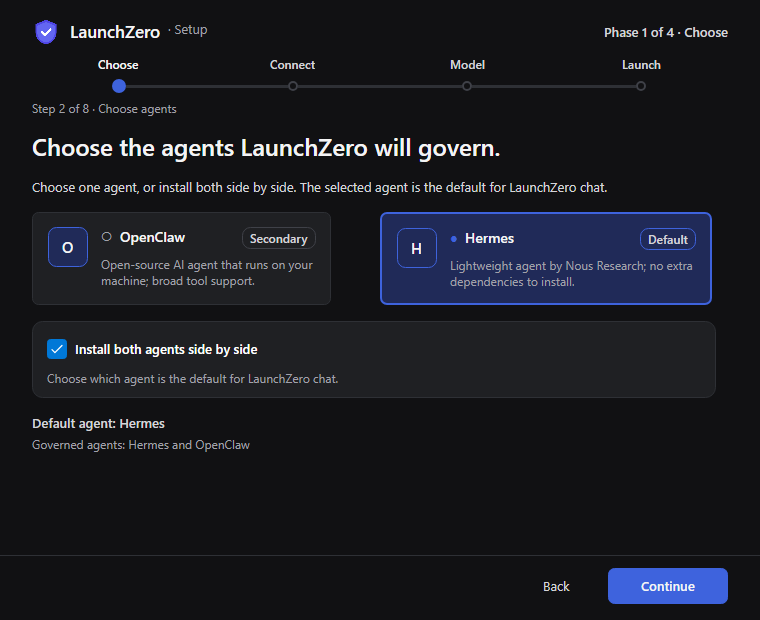
Run Hermes, OpenClaw, or both side by side. One agent is the default for active chat surfaces, and switching the default takes effect immediately.
Browse and install AgentMail, Gmail, or Outlook during setup, or add them later from the dashboard.
Keep control
Everyday choices remain approachable, advanced control remains available, and a earlier snapshots make configuration changes reversible.
LaunchZero connects Hermes and OpenClaw to its encrypted, local-only secret store for you. Keys managed through LaunchZero stay out of plaintext LaunchZero-managed JSON or YAML configuration.
Change common Hermes and OpenClaw settings through a simple form. Open the integrated JSON/YAML editor when you need direct, advanced control.
Automatic and manual snapshots keep a version history for each agent. Restore a previous snapshot when a change does not work out.
Set boundaries
A global security posture sets the outer boundary. Per-tool rules, least-privilege access, and the live trust score determine how each request is handled inside it.
Review and verify
The approval moment and the resulting Activity record stay connected, so the person who decided and the person who verifies later see the same request.
Proposed
Send the drafted message
Monitored toolgmail · send_message
Recipient, subject, and message stay attached to the request.
Decision gate
Writes and sends need approval
Your decision
Review the exact recipient, subject, and message.
Approve exact action · Deny request
The approval stays bound to this canonical request.
Submit for Execution
The approved request returns to the monitored tool.
Executed
The exact send runs once.
The monitored integration handles this approved request.
Audit receipt
Approved by you · succeeded
Policy, approval, execution, and provenance share one record.
unbroken chain
The approval shows the action, risk, request details, agent, trust score, triggering policy rule, requested and expiry times, Approval ID, Correlation ID, and Canonical Hash before you approve or deny.
Activity records Proposed, approved, denied, Executed, failed, and succeeded events. Filter or export the history and verify that its hash chain remains unbroken.

Review collected usage and spend estimates without confusing them with product price.
No - guided setup gets you from nothing to a running agent with governed tools in minutes and automates the CLI commands and hand-edited JSON/YAML config that running an agent normally requires.
If you want direct control, there is a simple form for the common options and an integrated editor for power users - but everyday setup never touches a terminal.
OpenClaw and Hermes, on Windows, macOS, and Linux. You can run either - or both side by side - each set up and configured automatically. One is the default, and switching takes effect immediately.
Yes. LaunchZero keeps automatic and manual snapshots for each agent's configuration. If a change doesn't work out, restore an earlier snapshot instead of hand-editing the file to undo the mistake.
Keys managed through LaunchZero live in its encrypted, local-only secret store rather than plaintext LaunchZero-managed configuration. LaunchZero connects Hermes and OpenClaw to that store for you. Provider credentials remain within the agent's configured trust boundary.
No - it's additive. Once LaunchZero is running you can use your agent's own interface or work with OpenClaw and Hermes inside LaunchZero, switching between them in one place. In either workflow, monitored tools and LaunchZero-managed integrations remain inside the same policy and evidence boundary. It runs natively on Windows, macOS, and Linux.
Yes. The complete local-first gateway is free and open source under AGPL-3.0. The core app does not require an account, telemetry, or a paywall.
Free, open source, local-first. Guided setup gets you to Launch in minutes.